“Your account will be suspended,”
“Immediate action required,” or
“URGENT”
- May also promise rewards of some kind ## 4. Mismatched URLs - Ensure the URLs in the email match the legitimate website - Hover over links to see the actual URL --- ## [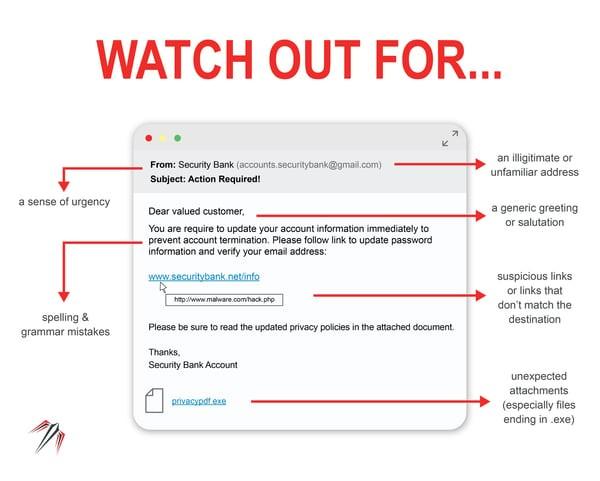](https://wiki.piedmont.edu/uploads/images/gallery/2025-06/F2DY3gWa90SwFudu-phishing2.jpg)Poor Grammar and Spelling - Look for spelling and grammatical errors - Phishing emails often contain typos and awkward phrasing - This is often due to attackers using Google Translate to translate into English ## Unexpected Attachments or Links - Do not open unexpected attachments or click on suspicious links - A link might say ‘www.yourbank.com’ but actually lead to a different website - Do not open an attachment if it is a `.exe` (Windows) or `.dmg` (MacOS) ## Request for Personal Information - Legitimate organizations will not ask for sensitive information via email - Emails asking for passwords, Social Security numbers, or credit card details are likely phishing attempts ## If you Suspect an email is Phishing If you suspect that an email is a phishing attempt, please refer to [Handling Suspicious Emails](https://wiki.piedmont.edu/books/student-resources/page/handling-suspicious-emails "Handling Suspicious Emails") and follow the instructions to report the email to the IT Department.