Exit Windows S Mode
This document provides a detailed guide for students on how to exit Windows S Mode on their devices. It includes step-by-step instructions for navigating the Microsoft support page, accessing the Microsoft Store, and successfully switching out of S Mode. Additionally, it addresses common issues such as the absence of the 'Get' button, with troubleshooting steps to disconnect from a work or school account, allowing students to complete the process independently.
Exiting Windows S Mode
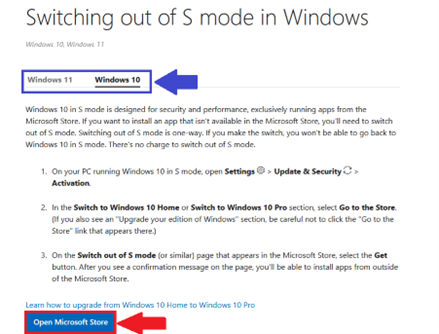
- Open a Web Browser and visit https://support.microsoft.com/en-US/Windows/Experience/Platform-variants/switching-out-of-s-mode-in-windows
- Choose your Operating System (Windows 10/Windows 11)
- Select Open Microsoft Store

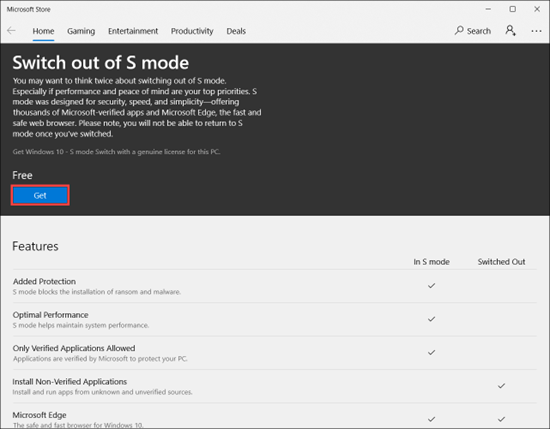
- Select Get to switch out of Windows S mode

Need Help?
If you encounter an error or need assistance with this guide, please contact the IT Department and include a screenshot with a brief description of the issue.
Contact the IT Department Here
Troubleshooting
‘Get’ button does not appear
If you see a message: Check with your IT or system Administrator, please follow the steps below.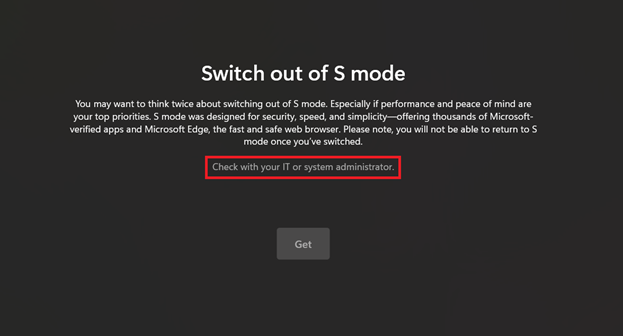
- Open Windows Settings
- Select Accounts
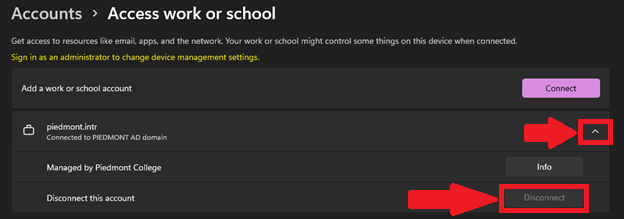
- Select Access Work or School
- Select the drop-down next to piedmont.intr
- Select Disconnect

- Please proceed to try the first section again.
Need Help?
If you encounter an error or need assistance with this guide, please contact the IT Department and include a screenshot with a brief description of the issue.
Contact the IT Department Here