Bitlocker
You can easily obtain your recovery key using Microsoft's online recovery key portal. Sudden loss of power, crashes, or improper shutdowns can cause BitLocker integrity checks to trigger recovery mode.
Recovery Key
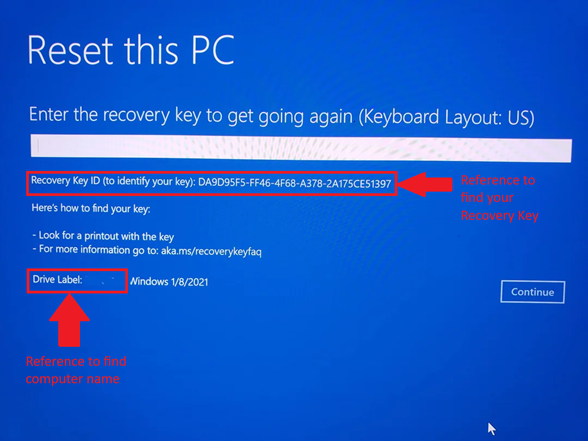
On a PC, Phone, or tablet, open a web browser and navigate tohttps://aka.ms/myrecoverykey
1. Sign in using your university email account.
2. Select Manage Devices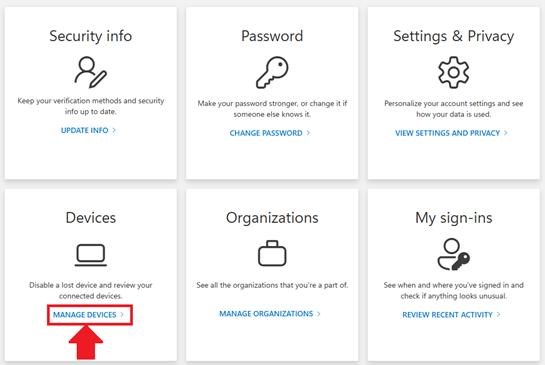
3. Select your computer from the list, your computer name should contain your name.
4. Once you find your device, select View Bitlocker Keys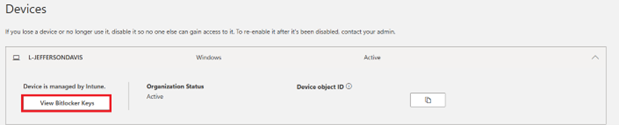
5.) Next, select Show Recovery Key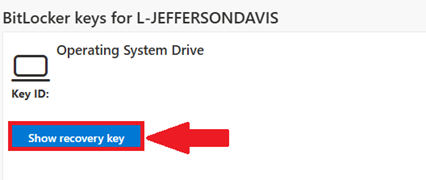
6. Finally, enter the recovery key into your locked device to regain access
7. Once you’ve typed in the Recovery Key, press Enter
💬 Support Contact Info
For any issues or questions regarding Bitlocker, please contact IT support by submitting a ticket through our helpdesk system.
📞 (706) 894-4205
✉️ ITSupport@piedmont.edu
🔗 https://itsupport.piedmont.edu/